



Unregister POS
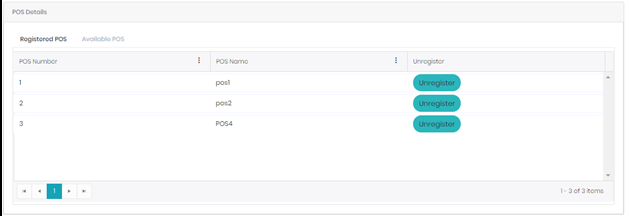
If any situation comes where the user required to change the existing POS (Device) which the user is currently using for Billing, first the Device should be unregistered with help of tenant user id from the ‘Cloud POS’. For this go to Masters and select Unregister POS. It will show two tabs ‘Registered POS’ and ‘Available POS’.
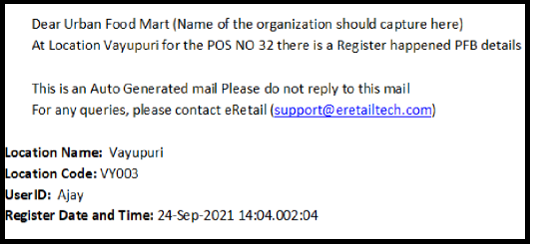
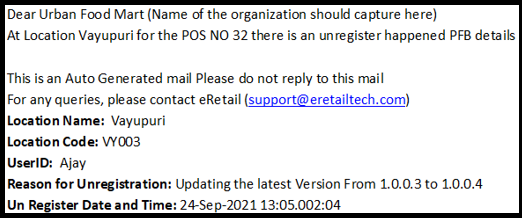
Hence, whenever the user Unregisters or Registers the POS a mail should trigger to the mail ID which used for registration of tenant.
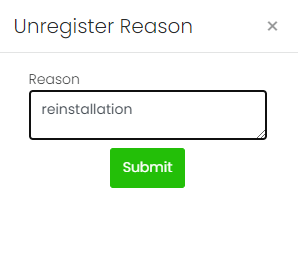
Registered POS tab will have the POS’s which are all already registered. Beside each record there will be one ‘Unregister’ button, by clicking it we can unregister it will ask the reason for un registration the POS then click on Submit.
After the user unregisters the POS, a mail will trigger to the mail ID which is used while registration of tenant.
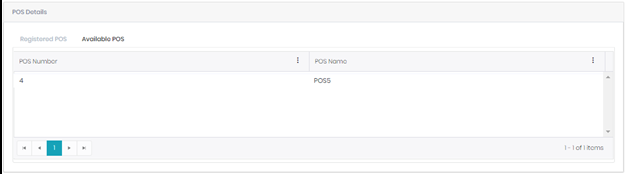
Available POS: ‘Available POS’ tab will have the list of POS, which are not yet registered in any of the device. If we unregister any POS, it will be removed from the ‘Registered POS tab’ and shown in this available POS tab.
When the user Register the POS, a mail should trigger to the mail ID which used for registration of tenant.